
TEMPLATES
A good reply, ready to reuse.
Personalize reusable messages with record context. Sync approved WhatsApp templates from your Meta account, then map, test and activate them in REDA Connect.
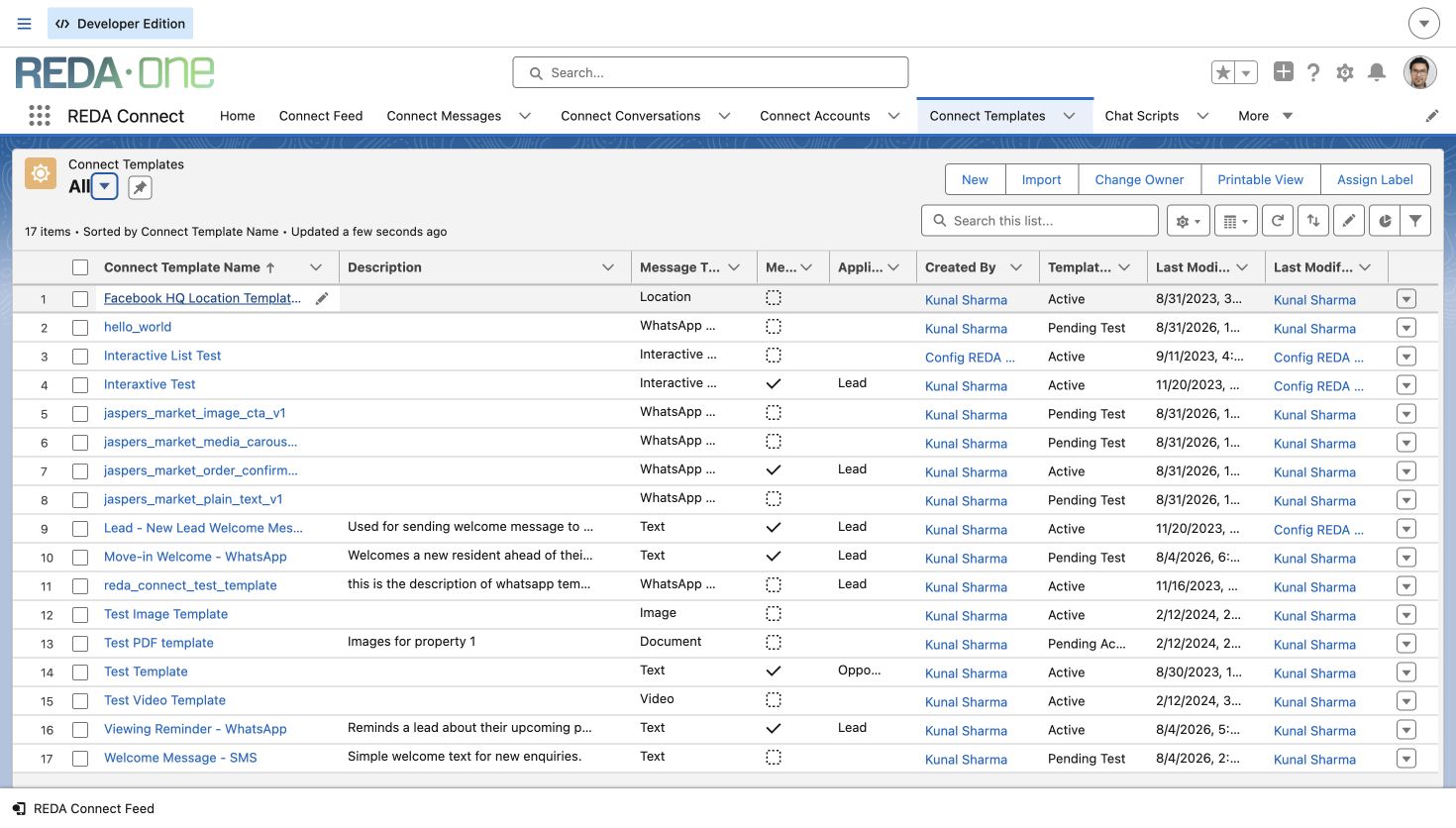 WhatsApp template sync guide

Connected messaging. Intelligent operations.
Bring WhatsApp, text messages, Messenger and Instagram into your Salesforce records and processes. Add AI that responds and moves the work forward.
Optional intelligence by Book a REDA Connect demo
Your provider accounts. Direct billing. No REDA per-message markup.
From the first message to the next business step.
Watch on YouTube View the Connect playlist
Captions: English, Português, Español, Français, Deutsch and Italiano. Use YouTube’s CC and Settings controls to choose captions and quality. The player loads when you press Play.
Your next inquiry might begin on Instagram. A follow-up arrives on WhatsApp. Another customer chooses Facebook Messenger or text messages. But does that conversation connect with the work your business needs to do? When messages sit in separate inboxes, your team has to connect the dots.
Find the customer record. Copy the details. Check the history. Decide who should respond. Meet REDA Connect.
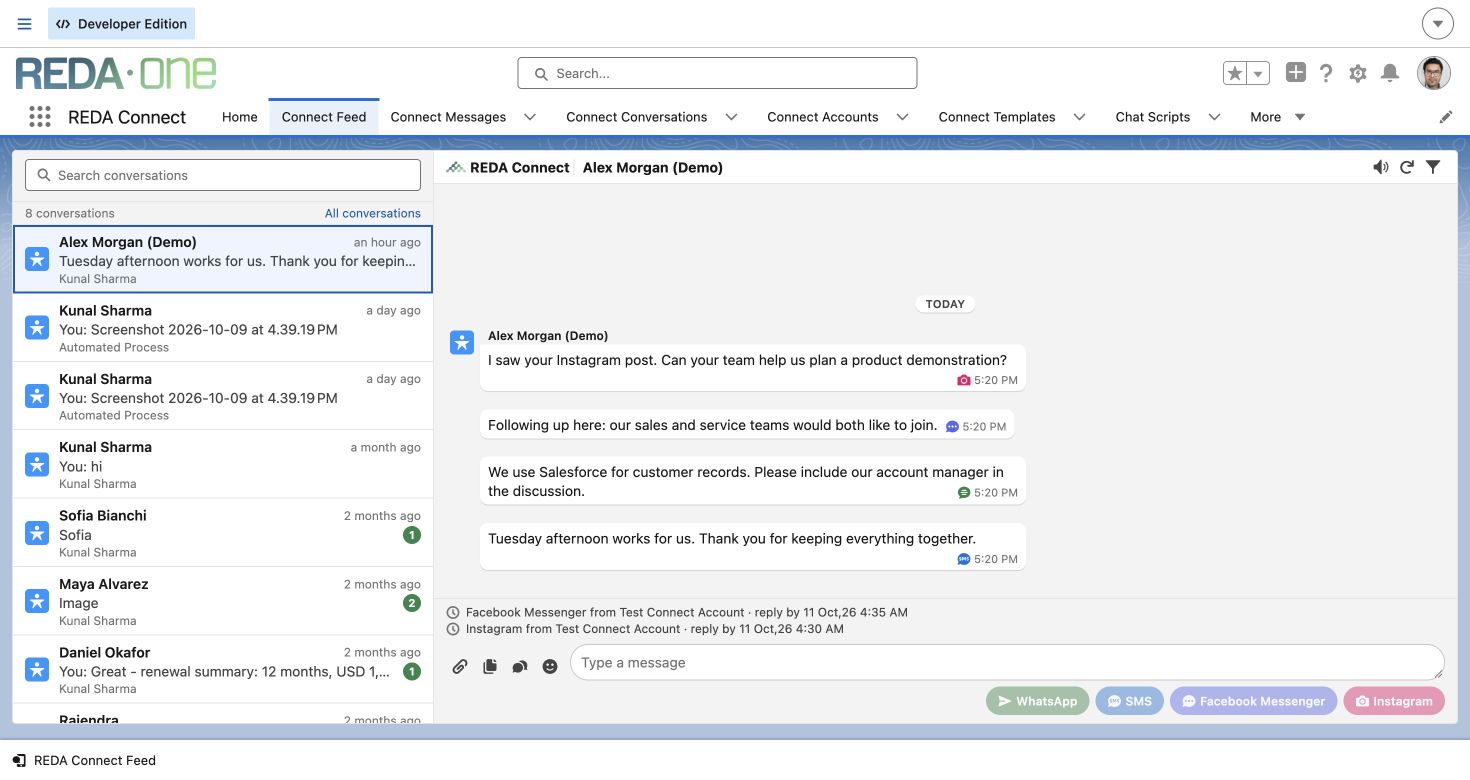
Four channels, one Salesforce workspace. Your team sees conversations together in Connect Feed. The latest activity moves to the top. Response counts show which messages need attention. Review the conversation and message details,
then reply from the same screen. Less switching. Easier follow-up. Native to Salesforce. Directly connected to your Meta business accounts and Twilio account for text messaging.
Keep your business accounts and provider relationships, while bringing communication into Salesforce. Every business works differently. Your sales stages, service processes and customer records should shape communication. Bring the channels together while staying in control of your workflow.
Make it work with your data model. Start with Leads and Contacts, or connect custom objects through Connect Account Config. Match conversations to the right records, according to your business setup. Manage multiple business accounts for different portfolios, brands or departments. Each account has its own channel setup and record mappings,
so conversations connect to the right part of your business. Create reusable message templates for the conversations your team handles every day. For WhatsApp, sync your approved templates from your Meta account into Salesforce, ready to use with your customer records. Put messaging into motion with Salesforce Flows.
A record change or a step in your process can trigger a follow-up, service update or appointment reminder, using the connected account and template you configure. Stay in control of costs, too. Provider charges remain separate from your REDA Connect subscription. REDA adds no markup per message.
See what you pay for the product and your messaging providers. Now add REDA AI, the intelligence layer for your connected messaging. This separate, optional product uses your standard operating procedures, business rules, team responsibilities and configured guardrails, together with Salesforce context and permitted actions.
When a message arrives, the agent can respond, ask the next question and carry the conversation forward. At the same time, it can capture details, update Salesforce records and take the next steps you allow. Your configured messaging workflows can work around the clock, seven days a week.
See it in our WhatsApp demonstration. Mira responds to an inquiry, gathers details, updates Salesforce and offers viewing times. One configured example of the conversation and the business process moving forward together. Four channels. Connected to your processes.
Powered by automation, with optional REDA AI intelligence. REDA Connect: the intelligent messaging layer for Salesforce. From the first message to the next business step.
Meet customers where
they already talk.
Less switching. Easier follow-up.
See the conversation, know what needs attention and take the next step without leaving Salesforce.
Choose a benefit to explore the real Connect Feed.
01 / One inbox
Follow the whole conversation.
Messages from WhatsApp, text messages, Messenger and Instagram appear together against the matched record. Your team can follow the conversation without piecing it together across separate inboxes.
02 / Prioritize replies
Start with the conversations that need you.
Unresponded-message counts make waiting conversations visible. New activity moves the conversation to the top, helping your team decide where to focus next.
03 / Find messages
Less searching. More time to respond.
Search the loaded conversation list by record name, or use the filter panel to narrow messages by channel, direction, ownership, date and response status.
04 / Message details
Get the details before your next step.
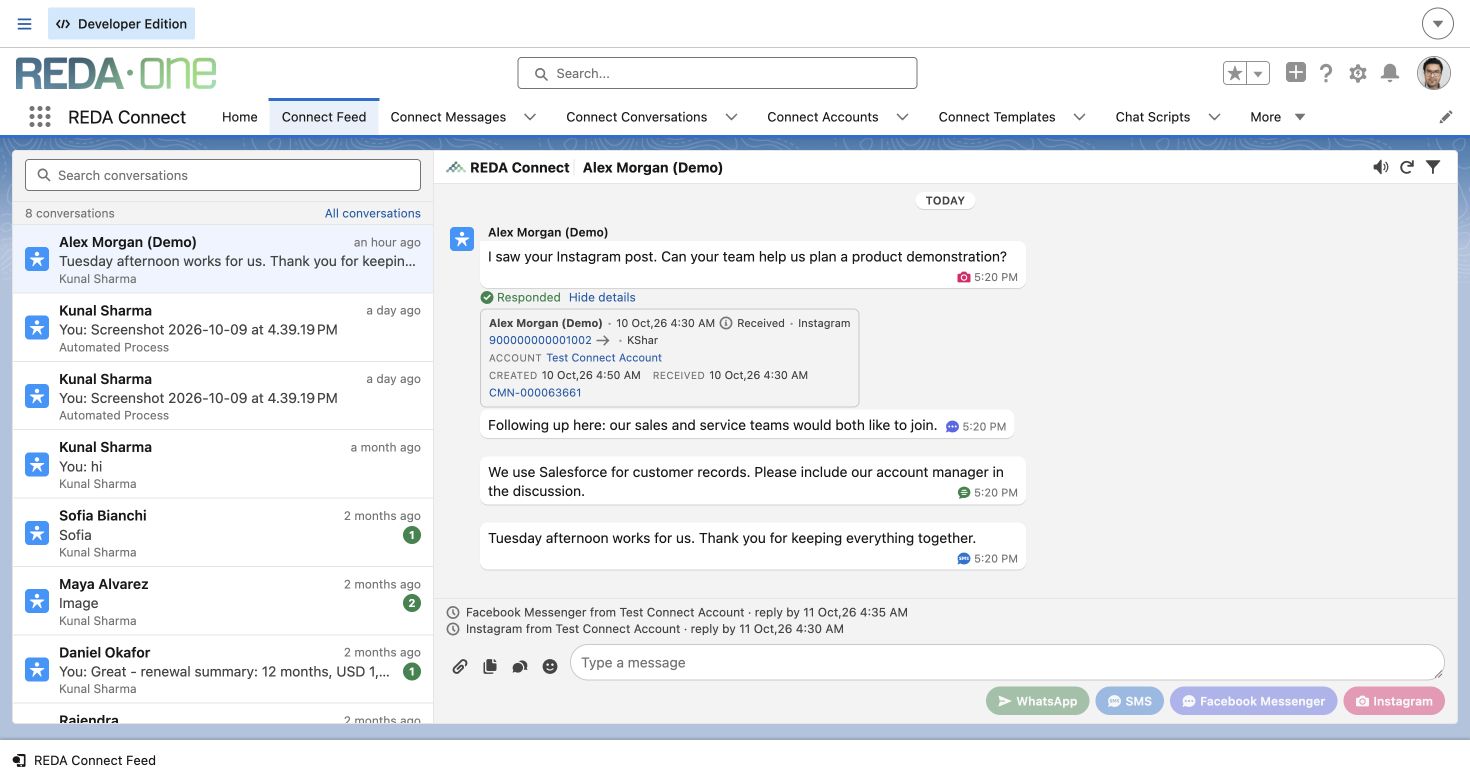
Open a message’s details to see the sender, channel, connected account, timestamps and status. Your team can investigate a message from the conversation itself.
05 / Reply in place
Keep the customer’s context in sight.
Review the history and write your reply in the same workspace. Available channel buttons let your team send through the accounts and record configuration set up for that person.
From the AppExchange community
One published REDA Connect review on Salesforce AppExchange.
Read the customer reviewThe automation features and message templates save a lot of manual effort
The company behind Connect
Add the intelligence layer

Give your connected channels intelligence. Separately licensed REDA AI uses your procedures, business rules and Salesforce context to respond, gather information and take the actions you allow, around the clock.
YOUR BUSINESS CONTEXT
SOPs & proceduresBusiness rules & guardrailsTeam responsibilitiesSalesforce record contextConfigured around
your business
WORK THAT MOVES FORWARD
Respond to inbound messagesContinue the conversationUpdate Salesforce recordsRun configured workflows 24/7Your configuration defines the knowledge, permitted actions and guardrails. Available outcomes depend on that configuration and connected services.
Real recorded demonstration · 6 min 26 sec · Six caption languages
Watch on YouTube Use CC for captions · Full screen for detail
REDA AI. Your agentic workforce for Salesforce. Configure agents to support employees, serve customers, and automate business processes. From a WhatsApp inquiry to the right next step.
In this video, we follow an API agent working behind the scenes: understanding a prospect, finding property information, updating Salesforce, and moving the conversation forward. Watch how business data, communication and AI work together. We have a dedicated WhatsApp number connected
to this Salesforce org through REDA Connect. REDA One is our real-estate management ERP, providing the property and inquiry records. REDA Connect brings conversations from WhatsApp, SMS, Facebook Messenger and Instagram into Salesforce, with messaging and workflow automation.
REDA AI adds the agentic layer. Here, that agent is Mira Praxis. Now let’s see it happen. The prospect sends a simple hello to the connected WhatsApp number. We refresh the inquiry list, and the new record appears.
Opening it shows the incoming message inside REDA Connect. The messaging integration has brought the conversation into the same workspace as the business record. Mira introduces herself as an AI leasing assistant and asks for the person’s full name and preferred area.
This is the first connection to the procedure: establish who is asking and where they want to live. The available areas are presented as choices, and the prospect selects Chicago. An API agent is called by another system or workflow to carry out a job.
In this setup, an incoming WhatsApp message triggers Salesforce automation, which gives Mira the inquiry context. She can use her configured tools to read information, update records and send a response. The employee does not need to open a copilot chat to start each turn.
Next, Mira asks what type of home the prospect wants. Kunal provides his name and email, then selects three bedrooms. He uses ordinary conversation and available choices. Behind the exchange, Mira has tools to turn those answers into fields the leasing team can use.
We refresh the inquiry and inspect the details. The full name, email and Chicago preference have been saved. This matters to the team: useful information is becoming part of the business record as the conversation develops. It does not have to remain buried in the chat.
Mira then presents a three-bedroom option at nine Walton. The response includes the recorded rent, the lease term and the property details returned by the search. She also asks about the move-in date and intended lease length. Here, the procedure connects the customer’s question to current Salesforce
inventory, while continuing to gather the missing requirements. What gives that work direction? Mira has been configured with the leasing team’s operating procedures. Understand the prospect and their requirements. Search the recorded inventory.
Use the returned prices and listing details. Keep the inquiry updated, and offer the appropriate next step. Her context brings together the inquiry, recent messages and related activity. Her tools provide the actions. These parts work together around this business process.
The workflow also sends a welcome email. We open the activity in Salesforce and inspect the branded message associated with this inquiry. The conversation began on WhatsApp, but the configured agent can coordinate another useful action using the contact information collected.
The sent email is recorded alongside the inquiry, where the team can review it. The prospect asks for photos or videos of the three-bedroom unit. Mira replies that media is not available for that unit and offers to check viewing times.
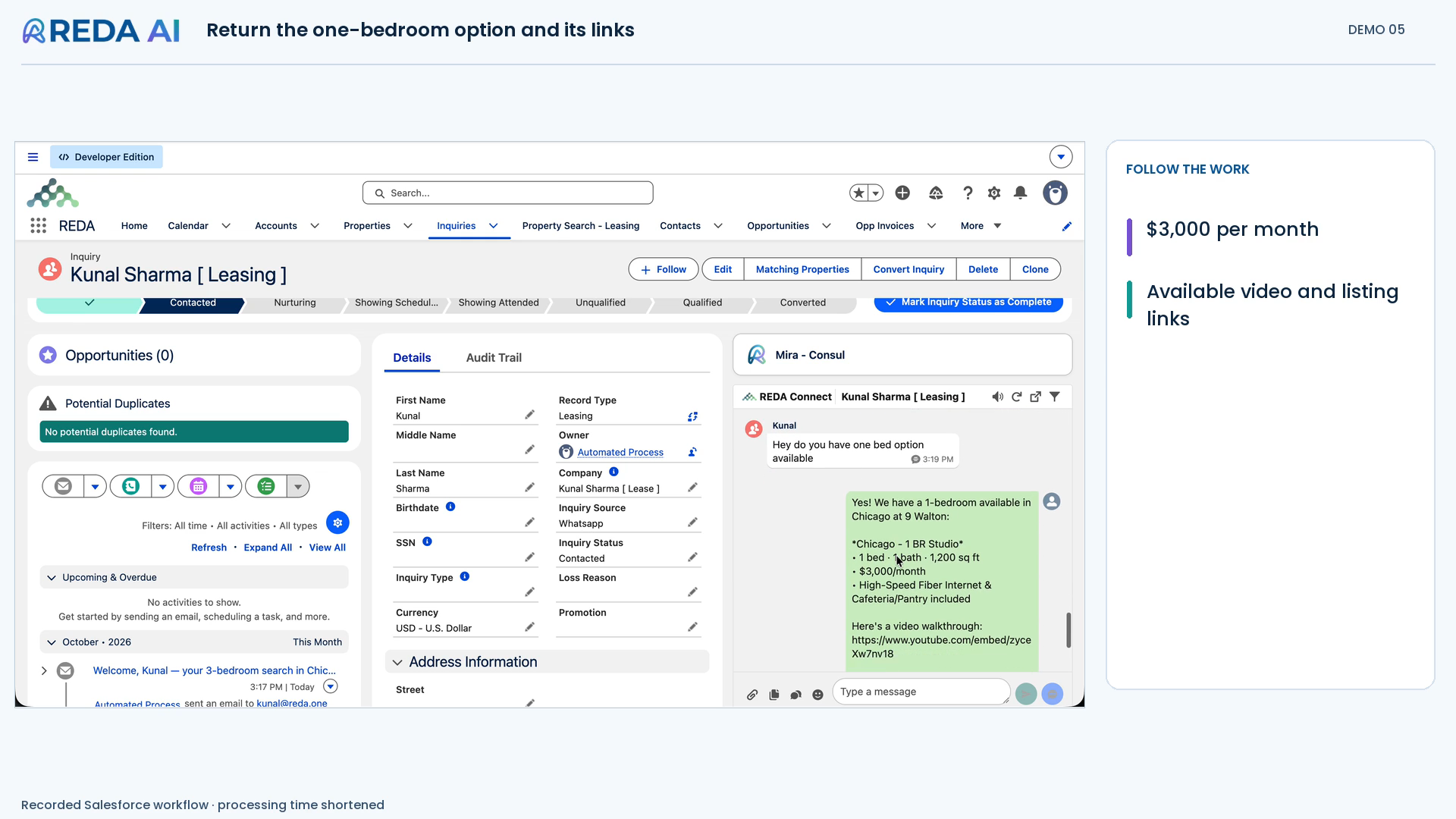
That is a useful boundary in this exchange: communicate the information available and offer another way forward. Then the prospect changes direction: is there a one-bedroom option? Mira responds to the new requirement using another property search. She provides the one-bedroom listing, its three-thousand-dollar monthly rent,
and the available video and listing links. The same agent adapts the next step as the conversation changes. Now Kunal says he would like to see the unit. Mira uses the configured viewing tool and offers available times to choose from.
This recording stops at the offered slots; a viewing has not yet been booked. The procedure has moved the inquiry from an initial question towards a practical next step. The inquiry is now at the Contacted stage, with the captured contact details and current one-bedroom preference saved.
The WhatsApp exchange and sent emails remain associated with it. A colleague can pick up the conversation with useful context, rather than ask the prospect to start again. What have we connected? REDA One supplied the business records.
REDA Connect carried the messages. REDA AI used the configured context, procedures and tools to respond, save information, send email and offer viewing times. For the prospect, it is one conversation. For the leasing team, it creates a more
useful inquiry and a clearer next step. WhatsApp is one entry point into this pattern. The API and automation channel can also support incoming email, scheduled follow-ups and other business events, with the relevant integrations and tools configured.
Your data model and your procedures shape the work. That is the broader opportunity: an agentic workforce for Salesforce, built around how your business operates. Hey, tell us about your one problem! We’ll build and test your first agent in your Salesforce sandbox.
Free within an agreed scope, with no obligation to proceed. Let’s bring an agentic workforce to your business!
See a configured example
Watch Mira respond, capture preferences, update the inquiry record, share information and offer viewing times.
Mira is a real-estate demonstration configured using REDA AI and REDA Connect. Your agents are configured around your own business.
Explore REDA AIDirect by design
Use your own Meta business accounts and Twilio SMS account. You pay those providers directly. REDA adds no markup on each message.
Your REDA Connect subscription is separate from provider charges, and REDA AI is optional and separately licensed. You retain ownership of your accounts and visibility into provider costs.
Discuss your channels and pricing
No REDA messaging middleware.
No REDA markup on each message.
Provider fees and channel sending rules apply. REDA AI is optional and licensed separately.
Meet customers where they already are
The channels your customers use, connected to the work your team does. Choose a channel to explore.

WhatsApp in Salesforce
Continue WhatsApp conversations from Salesforce. Sync approved Meta templates and automate follow-up with your configured Flows.
Match the message to the configured Salesforce record.
Reply from Connect Feed or use REDA AI with your procedures and permitted actions.
Capture information in Salesforce and use configured templates and Flows for follow-up.

Text messages in Salesforce
Send and receive text messages using your own Twilio account. Trigger updates from Salesforce and keep replies with the customer record.
A configured Salesforce Flow triggers the appropriate message.
The conversation appears against the matching record in Connect Feed.
Continue the exchange, or add REDA AI for configured responses and record updates.

Messenger in Salesforce
Bring Facebook Page enquiries into Salesforce. Keep the sender, conversation and next step together in your team’s workspace.
REDA Connect receives the message from your connected Facebook Page.
Configured matching connects the sender to the right Salesforce record.
Reply with context. Add REDA AI to gather details and update records through allowed actions.

Instagram in Salesforce
Turn Instagram direct messages into connected enquiries. Give your team the customer context and tools to carry the conversation forward.
A direct message arrives through the connected Instagram account.
Record matching and Connect Feed keep the conversation with your Salesforce work.
Continue the exchange and use optional REDA AI to capture information and take permitted business actions.
Illustrative configured workflows. Provider sending rules apply. REDA AI is optional and separately licensed.
The conversation belongs with the work
Bring messaging onto the record your team is already working on, so the customer’s details and conversation sit side by side.
Start with Leads and Contacts, or configure Connect Account Config for any custom object your business uses.
Connect business accounts for different departments, brands or portfolios, with the corresponding record mappings.
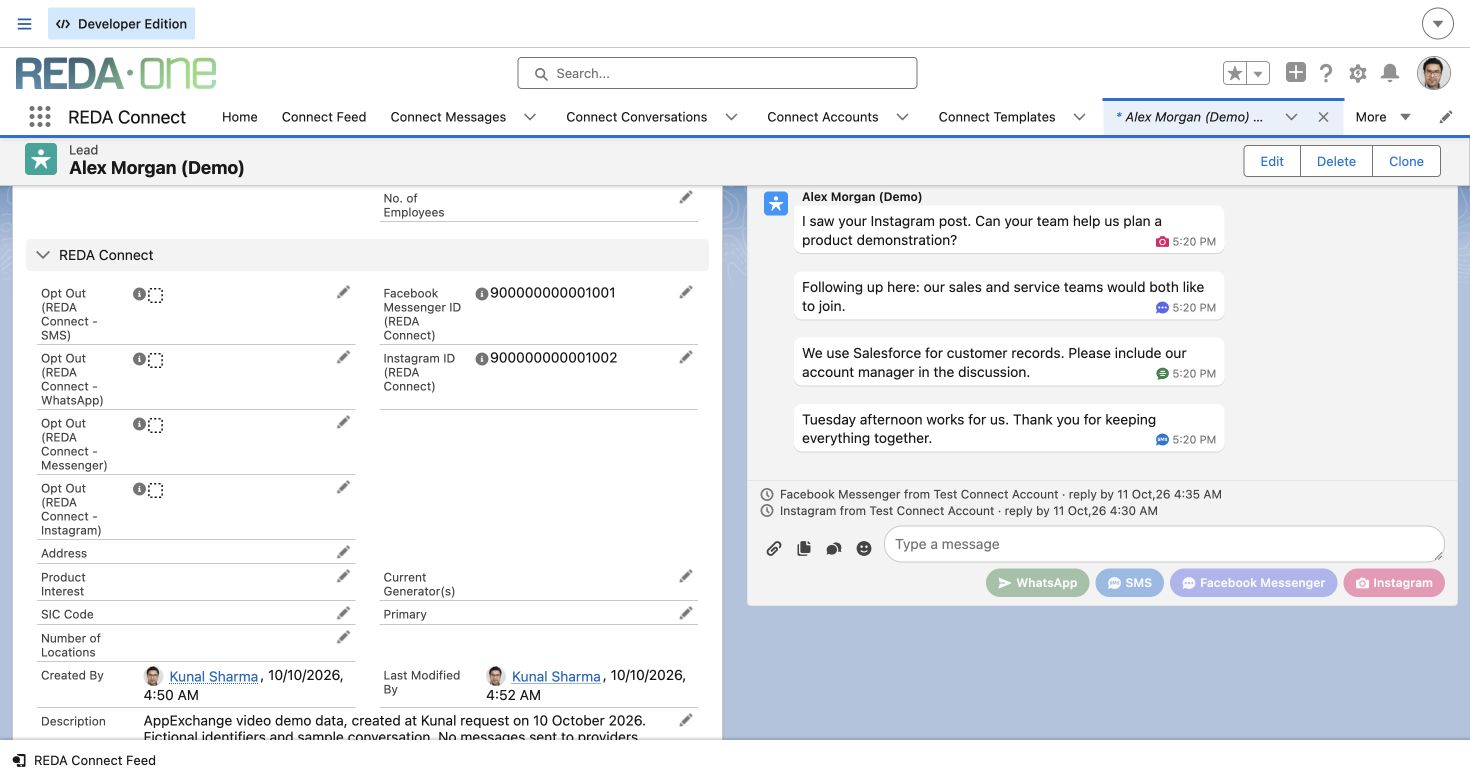 View the screen
Messaging that moves with your business
Give your team a consistent starting point, then let Salesforce automation handle the follow-up you have configured.
Personalize reusable messages with record context. Sync approved WhatsApp templates from your Meta account, then map, test and activate them in REDA Connect.
WhatsApp template sync guide Send a message when a Salesforce business condition is met. Keep communication connected to the record and the process behind it.
 Send the right messageKeep the history with the record
Illustrative workflow. Configure conditions, templates and channel rules for your business.
A clear path to your first reply
From Meta accounts and tokens to Salesforce layouts, permissions and your first conversation.
A few useful answers
REDA Connect supports WhatsApp, SMS through Twilio, Facebook Messenger and Instagram chat inside Salesforce. Your team can work from Connect Feed, with conversations tied to configured records.
Yes. Connect directly to your own Meta business accounts and Twilio SMS account. You pay Meta or Twilio directly. Provider charges are separate from your REDA Connect subscription, and REDA adds no markup per message.
Yes. Lead and Contact fields are provided out of the box. Connect Account Config lets you map the corresponding fields for any custom object and route messages to those records. Your administrator configures the mappings, permissions and layouts.
Yes. Configure Flow to send messages when your chosen business conditions are met. Use reusable templates and sync approved WhatsApp templates from Meta, then map, test and activate them. Provider rules and WhatsApp template requirements still apply.
REDA AI is a separately licensed intelligence layer. Configured agents use your SOPs, procedures, business rules, team responsibilities, guardrails and Salesforce context to respond to messages, continue conversations and update records through permitted actions. Workflows can be configured to operate around the clock.
For teams evaluating Marketing Cloud primarily for WhatsApp or SMS messaging and Salesforce-driven follow-up, REDA Connect is worth evaluating against those specific needs. It provides a focused messaging workspace, templates, Flow automation and optional REDA AI.
Marketing Cloud has a broader marketing scope, including campaign orchestration, customer-data capabilities, personalization and analytics. Compare the workflows and services your team actually needs; REDA Connect is not a replacement for every Marketing Cloud capability.
Explore Salesforce’s Marketing Cloud overviewYour administrator installs REDA Connect, assigns permissions, connects your business accounts and configures record matching. Add the appropriate fields and actions to your page layouts, then test receiving and replying. The Help Center covers Meta app setup, tokens, webhooks, Salesforce configuration and troubleshooting.
Let’s connect your business.
Show us how your team works. Let’s explore the right mix of messaging, automation and AI for your Salesforce.